[Help] Ryzen 9 9950X + ASUS ROG X870E-E Gaming WiFi | Stuck after "OC: Connecting drivers done..." | macOS Sonoma Installer | OpenCore 1.0.7

pvford55

New member
AMD OS X Member
Aug 20, 2025
17
0
1
United States - Texas, the humid part
CPU:
AMD Ryzen 9 9950X
System Specification:
  • CPU: AMD Ryzen 9 9950X (Zen 5, 16 cores / 32 threads)
  • Motherboard: ASUS ROG X870E-E Gaming WiFi
  • RAM: 64 GB DDR5
  • GPU: AMD Radeon RX 6900 XT
  • Storage: (add your NVMe model if known)
  • Target OS: macOS Sonoma (installer from external USB)
  • OpenCore version: 1.0.7 (DBG-107-2026-03-20)
  • SMBIOS: MacPro7,1

Problem Description:
OpenCore boots to the picker without issues. When I select "Install macOS Sonoma (external)", it reaches:

"OC: Connecting drivers done..."
"OC: Changed resolution to 1024x768@0 ..."

Then the screen goes black / no further progress — no Apple logo, no verbose macOS text, no kernel panic, no installer GUI. It hangs at this exact point.

The frequency message ("OCCPU: Failed to get FSBFrequency data using Apple Platform Info - Not Found") appears but I am ignoring it as requested — I only care about getting it to boot into macOS.

What I have already tried (current config state):
  • SSDT-HPET.aml disabled + its two renames disabled
  • SSDT-USB-Reset.aml disabled
  • SSDT-PLUG-ALT.aml still enabled (this is the next one I plan to disable based on advice)
  • SSDT-PMC.aml disabled
  • Boot-args simplified to: -v keepsyms=1 -amfi_get_out_of_my_way=1 (npci=0x3000 and revpatch=auto removed for testing)
  • Booter Quirks: DevirtualiseMmio=true, RebuildAppleMemoryMap=true, ProtectUefiServices=true, SyncRuntimePermissions=true
  • Kernel: DummyPowerManagement=true (in Emulate), ProvideCurrentCpuInfo=true, DisableIoMapper=true, XhciPortLimit=true, PanicNoKextDump=true
  • Kexts active: Lilu, VirtualSMC, WhateverGreen, NVMeFix, AppleALC, USBToolBox + UTBMap (others like RestrictEvents, AMDRyzenCPUPowerManagement, SMCAMDProcessor are disabled)
  • Full AMD Vanilla kernel patches (algrey cpuid_cores_per_package, commpage, cache info, mtrr/PAT fixes, etc.)

Attachments I will include:
  • Current config.plist
  • Latest OpenCore boot logs (opencore-*.txt)
  • SysReport.zip (contains ACPI tables, SMBIOS, CPUInfo, PCIInfo, GOPInfo, etc.)
  • Screenshot of the OpenCore picker + log when it hangs

What I need help with:
I need the system to progress past "Connecting drivers done..." into the macOS kernel / installer.
Any suggestions on which SSDT or quirk to disable/enable next, or any missing AMD Zen 5 / X870E-specific fixes would be greatly appreciated.

Thanks in advance for any help!
 

Attachments

System Specification:
  • CPU: AMD Ryzen 9 9950X (Zen 5, 16 cores / 32 threads)
  • Motherboard: ASUS ROG X870E-E Gaming WiFi
  • RAM: 64 GB DDR5
  • GPU: AMD Radeon RX 6900 XT
  • Storage: (add your NVMe model if known)
  • Target OS: macOS Sonoma (installer from external USB)
  • OpenCore version: 1.0.7 (DBG-107-2026-03-20)
  • SMBIOS: MacPro7,1

Problem Description:
OpenCore boots to the picker without issues. When I select "Install macOS Sonoma (external)", it reaches:

"OC: Connecting drivers done..."
"OC: Changed resolution to 1024x768@0 ..."

Then the screen goes black / no further progress — no Apple logo, no verbose macOS text, no kernel panic, no installer GUI. It hangs at this exact point.

The frequency message ("OCCPU: Failed to get FSBFrequency data using Apple Platform Info - Not Found") appears but I am ignoring it as requested — I only care about getting it to boot into macOS.

What I have already tried (current config state):
  • SSDT-HPET.aml disabled + its two renames disabled
  • SSDT-USB-Reset.aml disabled
  • SSDT-PLUG-ALT.aml still enabled (this is the next one I plan to disable based on advice)
  • SSDT-PMC.aml disabled
  • Boot-args simplified to: -v keepsyms=1 -amfi_get_out_of_my_way=1 (npci=0x3000 and revpatch=auto removed for testing)
  • Booter Quirks: DevirtualiseMmio=true, RebuildAppleMemoryMap=true, ProtectUefiServices=true, SyncRuntimePermissions=true
  • Kernel: DummyPowerManagement=true (in Emulate), ProvideCurrentCpuInfo=true, DisableIoMapper=true, XhciPortLimit=true, PanicNoKextDump=true
  • Kexts active: Lilu, VirtualSMC, WhateverGreen, NVMeFix, AppleALC, USBToolBox + UTBMap (others like RestrictEvents, AMDRyzenCPUPowerManagement, SMCAMDProcessor are disabled)
  • Full AMD Vanilla kernel patches (algrey cpuid_cores_per_package, commpage, cache info, mtrr/PAT fixes, etc.)

Attachments I will include:
  • Current config.plist
  • Latest OpenCore boot logs (opencore-*.txt)
  • SysReport.zip (contains ACPI tables, SMBIOS, CPUInfo, PCIInfo, GOPInfo, etc.)
  • Screenshot of the OpenCore picker + log when it hangs

What I need help with:
I need the system to progress past "Connecting drivers done..." into the macOS kernel / installer.
Any suggestions on which SSDT or quirk to disable/enable next, or any missing AMD Zen 5 / X870E-specific fixes would be greatly appreciated.

Thanks in advance for any help!
Check this link for more insight, @fabiosun motherboard is different but you'll be able to narrow down what ACPI files you need. I'll mention your Booter/ MmioWhitelist values in your config.plist seem incorrect. You may not need any entries at all if you turn on DevirtualiseMmio in Booter quirks.


Thank for your response. I think I have made some progress but I believe is am just failing around.

Current situation:

Installer launches successfully but stops immediately after boot.efi handoff. No kernel output begins.

Last line:

OCB: Matching <>/0[0] args on type 2

OpenRuntime rendezvous completes successfully:

Awaiting rendezvous with OpenRuntime r12
Got rendezvous with OpenRuntime r12
MAT support is 1

ACPI loads cleanly (26 tables detected, no failures).


Current Booter state (from logs)

DevirtualiseMmio = TRUE
SyncRuntimePermissions = FALSE
ProvideCustomSlide = TRUE
RebuildAppleMemoryMap = TRUE
ProtectUefiServices = TRUE

MmioWhitelist currently populated. - but disabled

Question:

Should MmioWhitelist be empty on X870E when DevirtualiseMmio is enabled?


ACPI currently active

SSDT-EC-USBX
SSDT-AWAC
SSDT-PLUG-ALT

Question:

Is SSDT-PLUG-ALT still appropriate on Zen 5 / X870E or should it be removed?


Kernel / kext question

Currently not loading:

RestrictEvents.kext
SMCAMDProcessor.kext
AMDRyzenCPUPowerManagement.kext

Question:

Is RestrictEvents required during installer boot when using MacPro7,1 on Zen 5?


Additional signal from logs

OCABC: RTPERMS 0

So:

SyncRuntimePermissions = FALSE

Question:

Expected to be TRUE on AM5 Sonoma installer boots?


Looking specifically for confirmation from anyone booting Sonoma installer on Zen 5 / X870E class boards about:

  • MmioWhitelist usage with DevirtualiseMmio
  • SyncRuntimePermissions expectation
  • SSDT-PLUG-ALT relevance
  • RestrictEvents requirement at installer stage

Attaching:

  • config.plist
  • SysReport
  • latest OpenCore DEBUG logs
  • screen capture of stall location
 
  • MmioWhitelist usage with DevirtualiseMmio
Are you following the instructions in this Troubleshooting guide?


Other than when using the Debug version of OpenCore to discover the MmioWhiltelist values, this entry should be Disabled or set as False in your config.plist. Once you have the MmioWhitelist entries added to your OC config.plist you should disable this quirk, assuming you have switched to the Release candidate for OpenCore.

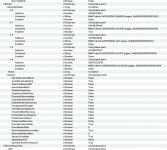
The screenshot below is of the Booter Section from a config.plist for the Asus B650E-F Gaming system in my signature. It shows the populated MmioWhitelist entries, only 2nd entry is enabled. Plus the settings used in the Booter > Quirks section.

Screenshot 2026-04-14 at 21.32.02.png Example of config.plist Booter section entries, as viewed in ProperTree


  • SyncRuntimePermissions expectation
Not sure what you mean by this statement, but I think it relates to the incorrect setting for ProtectUefiServices = TRUE, this Quirk should be disabled in your config.plist.

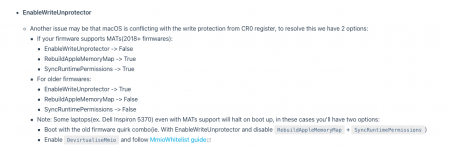
"MAT support is 1" indicates that the system supports Memory Allocation Table (MAT) and that RebuildAppleMemoryMap should be enabled. This is a standard setting for any AMD Hack.

Screenshot 2026-04-14 at 21.36.43.png OC troubleshooting guide for MAT Support = 1

  • SSDT-PLUG-ALT relevance
Very relevant if you created this SSDT using your system ACPI tables and Corpnewt's SSDTTime script. Otherwise, meh!

You should as a minimum have custom SSDT-EC.aml and SSDT-USBX.aml in your /EFI/OC/ACPI folder, along with SSDT-PLUG-ALT.aml any others are down to choice and whether they throw up an error that needs to be fixed when running SSDTTime against all yoursystem ACPI tables (not just your DSDT.aml table).


  • RestrictEvents requirement at installer stage
This kext is not required/essential during initial installation process.

Post installation it becomes more relevant and helps deal with Memory, PCIe slot and CPU naming issues that are common For AMD systems using the MacPro7,1 SMBIOS.
 
@pvford55
your initial boot EFI in OP is pretty wrong on different part of it

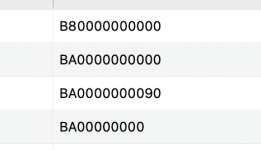
Kernel patches are not set for your CPU (core count part)
1776215403719.png

also MMIO whitelist and quirks are unusual set for your platform*

An important thing it is also related to your motherboard bios
Have you checked if you need ACPI patches?
For many asus it is mandatory to have DSDT patched

*
about this part
you can avoid to use MMIO whitelist using a proper quirks configuration in Booter quirk
enable DevirtualizeMMIO and DisableWrite variable (only to see if you do a step forward after you adjust core count for your CPU

Another part could be related also to your 6600 GPU
Some of it has problems with -v bootarg, and it could be useful try also without this bootarg (after you adjust all thins as i said above)
 
Title:
[Update] Ryzen 9 9950X + X870E-E + RX 6900 XT — Sonoma installer fails with OS.dmg.root_hash error despite valid createinstallmedia USB

Post:

To begin, I want to thank those who have responded. I have made progress but I am also still flailing. I am continuing troubleshooting on my Sonoma installer boot failure. The issue has progressed beyond earlier config.plist validation errors and now appears to fail at the early boot loader stage.

System configuration:

CPU: AMD Ryzen 9 9950X (Zen 5)
Motherboard: ASUS ROG X870E-E Gaming WiFi
Bios version: 2103 x64
RAM: 64 GB DDR5
GPU: AMD Radeon RX 6900 XT
Target OS: macOS Sonoma (tested 14.1 / 23B74)
SMBIOS: MacPro7,1
OpenCore: 1.0.7 DEBUG build
Installer created with createinstallmedia
USB format: HFS+ installer volume with separate EFI partition

Current boot failure:

Boot proceeds through OpenCore normally and reaches Apple boot.efi stage, then stops with:

usr\standalone\OS.dmg.root_hash
Err(0xE)
Err(0xE) <- EB.LD.LRH

Verbose output confirms failure loading:

usr\standalone\OS.dmg.root_hash.x86legacyap.im4m

This occurs immediately after BootKernelExtensions loading begins.

Verification steps already performed:

Installer USB created using:

createinstallmedia --volume /Volumes/FW_installer

Installer metadata present:

/Volumes/Install macOS Sonoma/.IAPhysicalMedia
ProductVersion: 14.1
Build: 23B74

However:

ls /Volumes/Install macOS Sonoma/usr/standalone

returns only:

i386/

Expected file missing:

/usr/standalone/OS.dmg.root_hash

Confirmed again with:

find /Volumes/Install macOS Sonoma -name OS.dmg.root_hash*

(no results)

Additional observations:

OpenCore log confirms:

OC: Loading Apple Secure Boot with Disabled (level 0)

Booter quirks currently:

ProvideCustomSlide = false
EnableSafeModeSlide = false
EnableWriteUnprotector = false
SetupVirtualMap = false

So this does not appear to be a Booter memory mapping issue.

Installer fails before kernel execution begins.

Questions:

Is this expected behavior if OS.dmg.root_hash is missing from installer media?
Has Sonoma changed packaging requirements for stage‑1 boot assets?
Could this relate to Zen 5 firmware interaction with boot.efi?
Is there any known OpenCore 1.0.7 interaction with Sonoma installers on X870E boards?

Two years ago essentially the same workflow produced a bootable installer on earlier hardware BIOS.

Any guidance from others running Sonoma on Zen 5 / X870E boards would be appreciated.
Encl. Screen snapshot, config.plist, OC log
 

Attachments

  AdBlock Detected
Sure, ad-blocking software does a great job at blocking ads, but it also blocks some useful and important features of our website. For the best possible site experience please take a moment to disable your AdBlocker.