
[Help] Infinite NVMe Hang (AppleNVMe Assert failed) - Ryzen 5600X / MSI B550M

smeds

New member
AMD OS X Member
Mar 30, 2022
2
1
3
CPU:
Ryzen 5 5600x
Hi everyone,

I'm trying to set up my AMD Hackintosh using OpenCore 1.0.7, but I am hitting a hard wall during the initial boot from the USB installer. The system completely hangs at the NVMe initialization.

I know the Crucial P5 (with the proprietary Micron controller) has a terrible reputation on newer macOS versions, but I wanted to see if anyone has a final workaround before I give up and buy a WD SN850X.

Hardware:
  • CPU: AMD Ryzen 5 5600X
  • GPU: ROG RX 6650 XT 8GB (Spoofed to 6600 XT via DeviceProperties + agdpmod=pikera)
  • Motherboard: MSI B550M-PRO VDH
  • RAM: 2x8GB Crucial Ballistix @ 3600MHz
  • Storage: 1TB Crucial P5 (CT1000P5SSD8) - Target Drive
  • macOS Version: 26.4.1
  • Bootloader: OpenCore 1.0.7
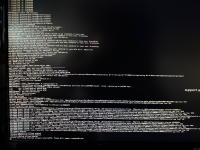
The Issue:When booting the installer, the log stops completely at:AppleNVMe Assert failed: 0 == (status) ErrorExit...virtual bool IONVMeController::start(IOService *)...There is no kernel panic backtrace; it just hangs there infinitely.

What I have already tried:

  1. NVMeFix.kext: If I disable NVMeFix.kext, the system actually Kernel Panics. With NVMeFix.kext enabled, it shields the panic but results in the infinite hang.
  2. APFS Trim: Set SetApfsTrimTimeout to -1 in Quirks to bypass the aggressive trim hang. (No change).
  3. Virtual Map: Toggled SetupVirtualMap to False due to B550 chipset quirks. (No change).
  4. Hardware Swap: Moved the Crucial P5 from the top CPU-linked M.2 slot to the bottom Chipset-linked M.2 slot to change how it presents to the kernel. (No change).
  5. AMD Power Kexts: AMDRyzenCPUPowerManagement and SMCAMDProcessor are strictly disabled in my config to prevent unrelated panics.
  6. BIOS: SATA is set to AHCI, NVMe RAID is disabled.
At this point, I am assuming the proprietary Micron controller in the P5 is just fundamentally incompatible with Apple's rewritten storage stack in Monterey+.

Has anyone successfully booted a modern macOS version on a standard Crucial P5, or is it time for me to buy a new drive and use an SSDT-NVME-DISABLE on this one?

Thanks in advance for any insight!1776547895293.png
 

Attachments

I have used a Crucial P5 NVME drive as a macOS boot drive, without any issues. All I added was NVMeFix.kext, that was as an afterthought not because it was essential to macOS being installed.

I didn’t have to add any other kexts, patches, quirks or boot arguments to have this and a Crucial P3 NVME drive boot macOS Sonoma or Sequoia. Not sure which systems they are currently installed in but haven’t had any issues with them.

Not sure that helps you, as you are obviously not having the same luck/fortune as me with your Crucial drive.

All I can recommend is to remove/delete any patches, quirks or boot arguments that you have added or changed while trying to fix this issue. How long did you wait when the system/installation seemed to stall? Sometimes the macOS installation can appear as if it has stalled but it is not always the case, it can be slow or doing something in the background which you just need to allow to finish, before it will continue the installation process.

You don’t want or need a WD SN850X drive for your B550 mATX motherboard, as it won’t use the full potential of the drive. You would be just as well served using a WD SN570 or SN770 drive. Given the stupid prices being asked for NVME drives these days, you are likely to be scalped or robbed blind, buying any M.2 NVME drives.

Do you have any other drives connected to your system while installing macOS? If yes, try disconnecting them from the system, see if that helps.

Are the PCIe lanes from the bottom M.2 connector shared with the SATA ports? Your motherboard manual should confirm if this is the case, and how to configure the connector and SATA ports to make best use of them. The bottom M.2 connector often has a Bios setting that allows it to run in three modes: ‘Auto’, ‘x2’ or ‘x4’.

If there are SATA drives connected to SATA ports 5 &/or 6 then the bottom M.2 connector might be working at x2 speed instead of x4 speed. This Might be a reason why the Crucial drive has issues, if the relevant SATA drive(s) are populated. Using the top M.2 connector is best option, as that connector won’t be sharing its PCIe lanes.
 
Bottom system in my signature contains the Crucial P3 Plus NVME drive, a similar B550m system., but using an Asus motherboard.
 
Here is an OpenCore EFI v1.0.5 which I created for another user who had a very similar system to yours. MSI B550m Pro VDH WiFi / Ryzen 5 5600X / RX 6600 XT.

I have amended it to suit your system, MSI B550m Pro VDH / Ryzen 5 5600X / RX 6650 XT as best I can, without having the system to hand.

I have added these elements to the attached EFI from your OC setup:
  1. USBToolBox.kext & UTBMap.kext. I have assumed these are correct.
  2. MacPro7,1 SMBIOS data. I have assumed you tested this on the Apple Support page and it is not used by a real Mac Pro.
I have changed WhateverGreen.kext for NootRX.kext, which natively supports the RX 6650 XT GPU. So no need for spoofed ID or agdpmod=pikera boot argument.

I have not included the SSDT-BRG0.aml table, try booting without it, as I am not sure it is 100% correct for your system. It is not essential to your installation of macOS.

I have not included any Sensor kexts, as again these are not essential for installing macOS and are as likely to cause issues with macOS as they are to resolve any.

Try installing macOS Monterey with this EFI and see how you get on. It should work in Big Sur, Monterey, Sonoma and Sequoia without the need for any edits.
 

Attachments

  • Like
Reactions: smeds
No magic tricks, just logic and application of the correct settings.

You need to look at applying some RestrictEvents fixes for CPU Name and common MacPro7,1 SMBIOS issues related to Memory and PCI slot alerts/errors. Have a read of this page and see about applying the NVRAM or Boot Argument fixes to your config.plist.


I use the RestrictEvents NVRAM entries in my AMD Hacks, as it just seems neater and a more stable fix. Note the Entries need to be added to the NVRAM > Add and Delete sections.
 
Hello! I tried the efi folder from @Edhawk and PCI configuration end there was an error RTC: Only single RAM bank (128 bytes) so I tried to DisableRtcChecksum true and it was great, till the screen turned black and the monitor entered stand by. Do you have any ideas?
Gigabyte B550M DS3H
5600G
RX 6600
 
Last edited:
I managed to successfully install it by adding agdpmod=pikera . After setup, it works hdmi and display port 2k 165hz, the gpu shows correctly. The sound is not working, tho. I will try some more.
 
Good to see you have successfully installed Tahoe.

The builtin Realtek audio codec isn’t natively supported in macOS Tahoe. You need to look at adding AppleHDA.kext to your Tahoe installation to have any chance of getting the audio to work with AppleALC.kext. See this GitHub article for guidance.

 
I will definitely try what you recommended. Also, I noticed that there might be no gpu acceleration, as the animations are bad although I have an 165hz monitor and the refresh rate is set at 165. I might try WhateverGreen.kext as I noticed it was missing from the EFI you provided. I can knock my self out trying as I have a dual boot with ubuntu so I can modify easily the efi partition from there in case I break something.
 
I did install WhateverGreen.kext (v1.7.0) last night and it enabled the glass effect but felt a little jitter compared with ubuntu. I will try your recommendation today. I gave up trying to fix the sound as i found out that my monitor has a 3.5mm jack on the back so i get audio from the display port, so lucky me!
I can just replace the WhateverGreen.kext with your version and it should work, or i have some other edits to do?
Thank you!
 
I really don't get it. It really appears that WhateverGreen.kext (v1.7.0) works on my Tahoe installation from what I can tell. I guess it shouldn't but considering the metal score I get in geek bench 6, it appears it does. I haven't got the chance to try v1.7.1d7 and I don't know if I should. Any advice?Screenshot 2026-04-25 at 13.21.19.png
 
Yes, you should use the forked version of WhateverGreen.kext.

Yes, it is a straight swap of the two kexts, no other edits required.
 
Ok. I did the swap. I can't say I see any difference from the 1.7.0 and the Geekbench gpu metal score is exactly the same. Anyways, I am extremely happy with the install and will definitely do a clozilla backup of the drive so I don't have to start over in case something breaks later. Probably I will not be touching the update button. Thank you for all your help.
 
  • Like
Reactions: Edhawk
You are welcome, glad to be able to help.
 
  AdBlock Detected
Sure, ad-blocking software does a great job at blocking ads, but it also blocks some useful and important features of our website. For the best possible site experience please take a moment to disable your AdBlocker.