
Frozen installation? 5900x - rx6800xt

naxovr

New member
AMD OS X Member
Jan 9, 2026
3
1
3
CPU:
5900x
Hi, I'm new here, and with this system of having a Hackintosh... (I had a Hackintosh with OS Tiger), but this has changed now and is different...
I would be very grateful if someone could help me build the EFI folder or if someone has the same or similar configuration to mine and could share it.
I tried to build one but it just does not work. Thanks guys

CPU: AMD Ryzen 5900x
GPU: AMD RX6800XT
Motherboard: Asus Rog Strix Gaming B550 Plus WiFi II
RAM: 64GB DDR4
SSD: 512GB NVMe (empty, dedicated to installing MacOS)

I've come this far:
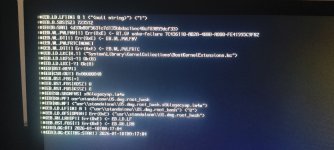

1768001465126.jpeg

But then I see in the files it generated this last time (two files with different times)... as if the PC were working in the background, but it shows me this and the text stays on the screen...

I also selected the Reset NVRAM option before running the .dmg icon.

Thanks!
 

Attachments

Solution
Try this EFI from OpenCore 1.0.5, it is based on the one used in my Asus TUF B550 system.
  1. I have removed the Serial Number, MLB, ROM and SystemUUID from the config.plist, so that is all you should need to change for your system to boot.
  2. I have replaced NootRX.kext with WhateverGreen.kext as your RX 6800 XT will work better with WEG not NootRX.
  3. I have removed the entries and SSDT's used for my RX 6750XT and Aquantia/Marvell 10G ethernet card.
  4. I have removed the kexts and config.plist entries required for my Broadcom WiFi card (Sonoma and Sequoia).
  5. I have added the agdpmod=pikera boot argument as you will need it for your RX 6800 XT.
This EFI currently works with Ventura, Sonoma and Sequoia. It is my B550M & X570...
I will have a look at your setup when I am at my desk later today.
 
Yes, that is true.

The current EFI I am using runs Ventura, Sonoma, Sequoia and Tahoe with no issues. I will post a copy of my current EFI for you to try, when I am at my desk.
 
Try this EFI from OpenCore 1.0.5, it is based on the one used in my Asus TUF B550 system.
  1. I have removed the Serial Number, MLB, ROM and SystemUUID from the config.plist, so that is all you should need to change for your system to boot.
  2. I have replaced NootRX.kext with WhateverGreen.kext as your RX 6800 XT will work better with WEG not NootRX.
  3. I have removed the entries and SSDT's used for my RX 6750XT and Aquantia/Marvell 10G ethernet card.
  4. I have removed the kexts and config.plist entries required for my Broadcom WiFi card (Sonoma and Sequoia).
  5. I have added the agdpmod=pikera boot argument as you will need it for your RX 6800 XT.
This EFI currently works with Ventura, Sonoma and Sequoia. It is my B550M & X570 systems that are running Tahoe.
 

Attachments

Solution
Try this EFI from OpenCore 1.0.5, it is based on the one used in my Asus TUF B550 system.
  1. I have removed the Serial Number, MLB, ROM and SystemUUID from the config.plist, so that is all you should need to change for your system to boot.
  2. I have replaced NootRX.kext with WhateverGreen.kext as your RX 6800 XT will work better with WEG not NootRX.
  3. I have removed the entries and SSDT's used for my RX 6750XT and Aquantia/Marvell 10G ethernet card.
  4. I have removed the kexts and config.plist entries required for my Broadcom WiFi card (Sonoma and Sequoia).
  5. I have added the agdpmod=pikera boot argument as you will need it for your RX 6800 XT.
This EFI currently works with Ventura, Sonoma and Sequoia. It is my B550M & X570 systems that are running Tahoe.
How wonderful! It worked on the first try. The problem I see is that my motherboard has Wi-Fi, but that Wi-Fi is apparently not compatible. It's Mediatek's 'RZ608 Wi-Fi 6E 80MHz'...
I have a TP-Link TL-WN722N USB, so I'll try that...
The Ethernet option is not feasible in my case because I don't have Ethernet cable installed in my current home.

Anyway, I've already overcome the first major hurdle, which was getting to the installation stage.
Thank you for your help, Edhawk.

Best regards
 
  • Like
Reactions: Edhawk
  AdBlock Detected
Sure, ad-blocking software does a great job at blocking ads, but it also blocks some useful and important features of our website. For the best possible site experience please take a moment to disable your AdBlocker.