
CPU Kernel Panic on boot with AMDFX-8350 and ASUS Sabertooth 990FX R2.0

paranoicb

New member
AMD OS X Member
Mar 15, 2021
2
0
1
I need help fixing my EFI folder.
I used opencore simplify to make my EFI folder for MacOS Sequoia. Updated open core to the latest version including kexts with OC aux tools. Also added my UTB usb kext.I downloaded the latest sequoia version from olarila and burn the image file with balena etcher.
I copied the EFI folder on the boot partition and disabled hfsplus driver and used openhfsplus to boot into opencore. If i use hfsplus driver i got a black screen.
install icon pops up on Open Core. When it boots i got this kernel panic on CPU
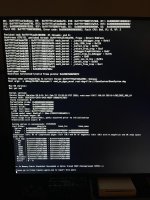
kernel panic.jpg

i will provide my EFI Folder and a CPU-Z report for the exact hardware i have.
Quick Specs
CPU : AMDFX-8350
MOBO : ASUS Sabertooth 990FX R2.0
RAM : Corsair vengance 2 X 8 GB (1600mhz) 2 X 4 GB (1300mhz) total 24GB clocked at 1300
GPU : Sapphire Pulse RX 580 8GB (correct bios version)

I followed @Edhawk 's guide how to setup the bios from his success with sabertooth 990FX and AMDFX cpu and all the settings are the same.
 

Attachments

Which disk contains Windows (Samsung or LiteOn) and which are you proposing to use for macOS?
Is the mSATA disk in an adapter in one of the PCIe slots or is it connected through a SATA enclosure?
Are you removing or disconnecting the Windows drive while trying to install macOS?
I hope you understand that the USB ports on your motherboard are not fully compatible with macOS.

Sequoia may be a step or two too far for your old FX system. I would recommend installing Monterey or Ventura first, so you see how well the system works with an older version of macOS. You can then update to Sonoma or Sequoia from within macOS.

Why are you using a Sequoia download from Olarila?
You can download macOS in windows using Corpnewt’s gibMacOS script, which downloads directly from Apple’s servers.
 
Windows is on Liteon. It's an msata to sata adapter . Samsung is just an NTFS drive . I didn't install yet the drive for the MacOS yet. I want to 1st try to boot it and then I will remove the drives before installation.

I used sequoia because opencore simplify suggested it will work on my cpu up to Tahoe. I also have another usb stick ready with Monterey that I can test and see if it works. I didn't test it yet.

I used Olarila because I was using it for many years in other systems I had over the years. I can try to use gibmacos but I believe I will have the same results.
 
Do not rely on OpenCore Simplify. Everything I have seen and heard about that ‘app’ leads me to believe it is someone’s AI construct and it isn’t accurate specifically for AMD Hackintosh systems.

Technically your FX system can run Tahoe, but in reality it will be worse than useless as a functional Hack. I stopped updating my identical FX system at Monterey because running Ventura was a step too far. It has an old CPU, incompatible AMD chipset and troublesome USB controllers. The graphics were the only upside when using this system, whether that be an old Nvidia Kepler GPU or a newer AMD GPU, such as your RX580. Running Ventura the system was slow to boot, slow to refresh the display and generally unusable as an everyday machine. Reinstalling Monterey fixed this.

Installing Big Sur would probably add a bit more umph to the system. But at the time it wasn’t receiving any security updates from Apple, so wasn’t considered a viable option.

Adding matched pairs of faster 1600 or 1867 MHz RAM might make your system less prone to issues. The quantity in your system is fine, but the slower 1300 MHz pair will be a big downside.

I used an old Samsung NVME drive mounted on a PCIE adapter in one of the lower slots, which made a big difference to how quickly the system booted. Probably made a difference to everyday performance but you get used to that too quickly to really consider it in general usage.
 
  AdBlock Detected
Sure, ad-blocking software does a great job at blocking ads, but it also blocks some useful and important features of our website. For the best possible site experience please take a moment to disable your AdBlocker.