
I need help fixing my EFI folder.
I used opencore simplify to make my EFI folder for MacOS Sequoia. Updated open core to the latest version including kexts with OC aux tools. Also added my UTB usb kext.I downloaded the latest sequoia version from olarila and burn the image file with balena etcher.
I copied the EFI folder on the boot partition and disabled hfsplus driver and used openhfsplus to boot into opencore. If i use hfsplus driver i got a black screen.
install icon pops up on Open Core. When it boots i got this kernel panic on CPU
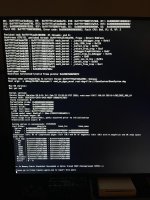
i will provide my EFI Folder and a CPU-Z report for the exact hardware i have.
Quick Specs
CPU : AMDFX-8350
MOBO : ASUS Sabertooth 990FX R2.0
RAM : Corsair vengance 2 X 8 GB (1600mhz) 2 X 4 GB (1300mhz) total 24GB clocked at 1300
GPU : Sapphire Pulse RX 580 8GB (correct bios version)
I followed @Edhawk 's guide how to setup the bios from his success with sabertooth 990FX and AMDFX cpu and all the settings are the same.
I used opencore simplify to make my EFI folder for MacOS Sequoia. Updated open core to the latest version including kexts with OC aux tools. Also added my UTB usb kext.I downloaded the latest sequoia version from olarila and burn the image file with balena etcher.
I copied the EFI folder on the boot partition and disabled hfsplus driver and used openhfsplus to boot into opencore. If i use hfsplus driver i got a black screen.
install icon pops up on Open Core. When it boots i got this kernel panic on CPU
i will provide my EFI Folder and a CPU-Z report for the exact hardware i have.
Quick Specs
CPU : AMDFX-8350
MOBO : ASUS Sabertooth 990FX R2.0
RAM : Corsair vengance 2 X 8 GB (1600mhz) 2 X 4 GB (1300mhz) total 24GB clocked at 1300
GPU : Sapphire Pulse RX 580 8GB (correct bios version)
I followed @Edhawk 's guide how to setup the bios from his success with sabertooth 990FX and AMDFX cpu and all the settings are the same.
