
9800X3D and Gigabyte X870E AORUS Elite WiFi7 on Sonoma Build

mrt360

New member
AMD OS X Member
Apr 22, 2026
4
0
1
CPU:
9800x3d
Hi,

I'm working with Claude to try to build this:

CPU: AMD Ryzen 7 9800X3D
Motherboard: Gigabyte X870E AORUS Elite WiFi7 (ATX, AM5)
GPU (temporary): XFX RX 570 4GB — in primary PCIe x16 slot for build phase
GPU1 (gaming): ZOTAC RTX 5090 SOLID 32GB — removed during build phase, needs SSDT to hide from macOS laterGPU (macOS):
GPU2: PowerColor Red Devil RX 6900 XT 16GB (Device ID 0x73BF) — will go in AOOSTAR AG02 eGPU dock eventually
RAM: 2 x 48GB DDR5 Corsair Vengeance — not yet purchased
Case: be quiet! Dark Base Pro 900 v1
PSU: Corsair HXi 1200W ATX 3.0

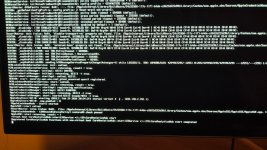
I'm not very far in to be honest. It's hanging at the place shown in the attached photo when booting from the USB. I haven't yet reached the start point of the install. I've attached the EFI here.

I've tried:
  • SetupVirtualMap → false (AM5 requirement per mikigal README)
  • SecureBootModel → Disabled
  • DmgLoading → Any
  • AM5 PCI bus enumeration fix → enabled
  • DevirtualiseMmio → true then reverted to false
  • EnableWriteUnprotector → true
  • ProtectUefiServices → true
  • DisableIoMapper → true
  • csr-active-config → 03000000
  • boot-args additions: agdpmod=pikera, amfi_get_out_of_my_way=1, revpatch=sbvmm, npci=0x2000
  • Updated OpenCore from 1.0.4 to 1.0.7
  • Bypassed KVM, plugged keyboard directly
  • Tried USB 2.0 port
The installer was downloaded as version 19.8.42

Any ideas where I'm going wrong?

Thanks in advance!
 

Attachments
  • 20260422_192601.jpg
    20260422_192601.jpg
    391.7 KB · Views: 2
  • EFI.zip
    EFI.zip
    7 MB · Views: 3
Last edited:
You might want to have a look in the Success Stories forum, as there are some other AMD 800 Series systems that have been mentioned and are running macOS.


You may be able to see what is different in your setup compared to the other OC EFI’s.
 
  • Like
Reactions: mrt360
@mrt360
your config.plist booter section isnt correct
You can avoid to declare a MMIO WHitelist if you enable also DisablevariableWrite quirk (not advised but possible to do )
I think you have also to add SSDT-Plug in your ACPI section
 
  • Like
Reactions: mrt360
Thanks for the responses so far. I wanted to update the thread as the plan has changed significantly.
I've decided to abandon the eGPU approach after research suggested that USB4 eGPU on an AMD hackintosh is unreliable and largely unproven, particularly with the ASMedia USB4 controller on the X870E. Instead I'm going to mount both GPUs internally in a new case (Lian Li O11 Dynamic EVO XL) which has room for the 5090 and a second card simultaneously if I put the 5090 in an upright position at the front of the case.

Updated hardware plan:
GPU1 (gaming): ZOTAC RTX 5090 — primary PCIe x16 slot, hidden from macOS via SSDT
GPU2 (macOS): RX 6700 XT — secondary PCIe slot, native macOS support
Case: Lian Li O11 Dynamic EVO XL
PSU: be quiet! Dark Power Pro 13 1600W

Current boot issue:
For this initial build and testing phase I'm using an XFX RX 570 4GB as a temporary display GPU in the primary PCIe x16 slot — the 5090 and 6700 XT are not yet in the machine. I'm stuck at CoreAnalyticsHub start completed during the Sonoma installer boot and cannot reach the installer. I've attached the current EFI.

Based on forum feedback I'm planning to make the following changes to the config before the next boot attempt:

Fix booter section (SetupVirtualMap, DevirtualiseMmio, DisableVariableWrite)
Add SSDT-PLUG-ALT.aml
Add NVMeFix, AMFIPass, AMDRyzenCPUPowerManagement and SMCAMDProcessor kexts
Switch SMBIOS to MacPro7,1

Any feedback on whether this approach is correct for the X870E/9800X3D combination would be greatly appreciated.
 
The RX 6700 XT isn’t natively supported by macOS, you need to use NootRX.kext to have that card working in macOS.


You don’t need the AMDRyzenCPUPowerManagement and SMCAMDProcessor kexts when installing macOS. They are not essential to the system booting macOS, in fact they are more likely to cause unnecessary issues than they are to help matters.

No EFI attached to you previous post.

You should use Corpnewt’s SSDTTIME script to generate the SSDT’s required for your system, not rely on generic SSDT’s that may not fit correctly. This script works in Windows as well as macOS, so you can use it before you create the EFI folder.


You would be advised to generate a custom USB kext (UTBMap.kext), again in Windows, using USBToolBox Tool, so you have your USB ports active and available in the macOS installation process.

 
The RX 6700 XT isn’t natively supported by macOS, you need to use NootRX.kext to have that card working in macOS.


You don’t need the AMDRyzenCPUPowerManagement and SMCAMDProcessor kexts when installing macOS. They are not essential to the system booting macOS, in fact they are more likely to cause unnecessary issues than they are to help matters.

No EFI attached to you previous post.

You should use Corpnewt’s SSDTTIME script to generate the SSDT’s required for your system, not rely on generic SSDT’s that may not fit correctly. This script works in Windows as well as macOS, so you can use it before you create the EFI folder.


You would be advised to generate a custom USB kext (UTBMap.kext), again in Windows, using USBToolBox Tool, so you have your USB ports active and available in the macOS installation process.

Thanks for the detailed information. I think I've added the EFI in my first post on Wednesday at 8.38pm GMT. Isn't it working for you? I'm away this weekend, but will resume efforts on Sunday, so any suggestions would be great.
 
Update — macOS Sonoma successfully installed!

After a lot of troubleshooting I've managed to get macOS Sonoma installed and booting. Here's what fixed the various issues for anyone who finds this thread in future:

Issue 1: EXITBS:START crashFixed by adjusting the Booter Quirks — specifically enabling DevirtualiseMmio and DisableVariableWrite, and fixing SetupVirtualMap.

Issue 2: CoreAnalyticsHub hangFixed by running SSDTTime to generate proper board-specific SSDTs (SSDT-PLUG-ALT, SSDT-HPET, SSDT-USBX, SSDT-USB-Reset) and updating the kexts to include NVMeFix and AMFIPass. Also switched SMBIOS to MacPro7,1.

Issue 3: IOPCIConfigurator kIOPCIEnumerationWaitTime 900 hangFixed by disabling Resizable BAR in the BIOS. This was the key fix that finally got past the PCI enumeration stage.

Current status:macOS Sonoma 14 is installed and running on the Gigabyte X870E AORUS Elite WiFi7 with the Ryzen 7 9800X3D and XFX RX 570 as a temporary display GPU.

Still to do:

  • Fix ethernet (RealtekRTL8111 not picking up automatically)
  • Move EFI to internal drive
  • Add RX 6700 XT as the permanent macOS GPU — I understand this requires NootRX.kext as it's not natively supported. Are there any other kexts or config changes needed for the 6700 XT on this platform?
  • Test GPU disable SSDT approach with RX 570 and 6700 XT together before committing to the final RTX 5090 + RX 6700 XT configuration
  • Eventually swap to final GPU configuration (RTX 5090 + RX 6700 XT)

Thanks for the help so far — any advice on the ethernet issue and the 6700 XT configuration would be appreciated!
 
The RX 6700 XT would be a straight swap for the RX 570 GPU. No other fixes or patches required, just a recent version of NootRX.kext used in place of WhateverGreen.kext.

Don’t use the two kexts at the same time, as they clash during the OS loading process.

You may, or may not need to generate an SSDT-Bridge.aml table, using Corpnewt’s SSDTTime script and your System DSDT.aml table, so the full IOReg Path/Name of the RX 6700 XT is available in macOS. You can check this when you have the RX 6700 XT in the system. The IOReg name is visible on the Hackintool > PCIe tab, look and see if the new dGPU has ‘pci-bridge’ in the IOReg Path/Name.
 
  AdBlock Detected
Sure, ad-blocking software does a great job at blocking ads, but it also blocks some useful and important features of our website. For the best possible site experience please take a moment to disable your AdBlocker.