Sonoma 14.7 -> Sequoia 15.6 update: 10G Aquantia Ethernet stopped working, together with mouse and keyboard

zegsbry

New member
AMD OS X Member
Mar 1, 2023
8
0
1
CPU:
3950X
Before I updated to Sequoia 15.6, my Hackintosh had no problems. On Sonoma 14.7, I could access the internet via the 10 GbE AquantiaAQC113 and all my SATA HDDs were visible in the Finder and in the Disk Utility.

However, then I decided to update to Sequoia 15.6. Before updating to Sequoia, I updated OpenCore and all kexts to their latest versions and I modified my config.plist by using the updated Aquantia patches by CaseySJ (I tried to use Set 1 and then Set 2). I also updated the AMD Vanilla patches.

Then I tested if the updated EFI works by restarting and booting into the old Sonoma 14.7. Everything worked without a problem.

I finally decided to update to Sequoia. When the update finished, I noticed that a few seconds after connecting the Ethernet cable into the Aquantia slot, my mouse and keyboard stopped responding and in the Settings app > Network > Ethernet, I saw that the Ethernet device has a yellow dot with the text "Self-assigned IP" next to it.

If I did not attach the Ethernet cable to the slot, the mouse and keyboard worked flawlessly.

Another problem was that my HDDs were not recognized by the hackintosh. They were not visible even in Disk Utility, but at the star I saw a few error pop-ups with the title "The disk you attached was not readable by this computer." a 3 buttons "Eject", "Ignore", "Initialize...".

Is this a known problem? Thanks!
 
Regarding your AQC113 Ethernet NIC.

Have you remembered to Enable the ForceAquantiaEthernet Kernel > Quirk?

Screenshot 2025-08-10 at 20.24.25.png Kernel > Quirks > ForceAquantiaEthernet

No idea why the mouse and keyboard don't work when the Ethernet cable is connected.

Nor why your HDDs are not showing correctly.
 
Regarding your AQC113 Ethernet NIC.

Have you remembered to Enable the ForceAquantiaEthernet Kernel > Quirk?

View attachment 17753 Kernel > Quirks > ForceAquantiaEthernet

No idea why the mouse and keyboard don't work when the Ethernet cable is connected.

Nor why your HDDs are not showing correctly.

Thanks for the very fast answer.

Kernel > Quirks > ForceAquantiaEthernet is set to true.
Kernel > Quirks > DisableIoMapper is set to false.

I used the same settings with Sonoma, which worked well, without any issues.

My motherboard is Asus ProArt X670E running the original BIOS. Do you think a BIOS update could fix this problem or is it unlikely?
 
Very unlikely to be Bios related.

Check you have the correct Aquantia Kernel Patches ,with the MaxKernel showing 25.99.99. So you are sure the 10G NIC is enabled correctly for Tahoe and earlier versions of macOS. These patches were updated as of 8th July 2025.


I have a number of Hack's running Sequoia using different Aquantia AQC107 and AQC113C Ethernet 10G NICs. They all work with CaseySJ's patches, I usually opt to enable the first 9 x patches.

I have found that some of these 10G NICs require a helper SSDT.

The AMD Asus B550m system I am using currently is one of those that need the SSDT-AQUANTIA-AQC113C.aml table added to my OC setup in order for the 10G NIC to work correctly.

So you can see what it does and how it interacts with the IOReg Name for the PCIe slot the NIC is installed into I have attached a screenshot of the SSDT.

Screenshot 2025-08-10 at 22.07.05.png SSDT-AQUANTIA-AQC113C.aml

A copy of the SSDT I am using is also attached, in case you need to use it.
 

Attachments

Forgot to attach the screenshot showing the Aquantia NIC in the Hackintool > PCIe tab, with the relevant IOReg Name highlighted.

Screenshot 2025-08-10 at 22.24.45.png

Seeing this will make more sense of the IOReg location name used in the SSDT.
 
Forgot to attach the screenshot showing the Aquantia NIC in the Hackintool > PCIe tab, with the relevant IOReg Name highlighted.

View attachment 17756

Seeing this will make more sense of the IOReg location name used in the SSDT.

Thank you for your help, I sincerely appreciate it!

I think I have the latest Aquantia Kernel Patches and the latest AMD Vanilla Patches in my config.plist, but I am attaching my config.plist just to be sure.

When I copied your version of SSDT-AQUANTIA-AQC113C.aml into the EFI > ACPI folder and then enabled the .aml file in the ACPI > Add section in config.plist, there was no change when I booted into Sequoia (the network still did not work and the mouse / keyboard still stopped working after connecting the Ethernet cable).

I guess that I will have to run Hackintool, look at the PCI address (IOReg name?) of the Aquantia NIC on my specific PC, use iasl to disassemble your SSDT-AQUANTIA-AQC113C.aml file into a .dsl file, adjust the PCI address in the .dls file, and finally compile the .dls into .aml, which I should copy to the EFI > ACPI folder, right?
 

Attachments

Yes, you need to use the IOReg path for the 10G NIC adapter in your system.
 
Yes, you need to use the IOReg path for the 10G NIC adapter in your system.

Applying my custom SSDT-AQUANTIA-AQC113C.aml did not fix the problem. I still saw "Self-assigned IP" in Settings > Network > Ethernet.

Below is the IOReg address of my on-board Aquantia NIC and the accordingly modified SSDT (I only changed the address in the "External" and "Scope" blocks).

IOReg address of my Aquantia NIC, copied from Hackintool:
Code:
IOService:/AppleACPIPlatformExpert/PCI0@0/AppleACPIPCI/GPP7@2,1/IOPP/UP00@0/IOPP/DP40@8/IOPP/UP00@0/IOPP/DP10@2/IOPP/AQCL@0

PciRoot(0x0)/Pci(0x2,0x1)/Pci(0x0,0x0)/Pci(0x8,0x0)/Pci(0x0,0x0)/Pci(0x2,0x0)/Pci(0x0,0x0)

My version of SSDT-AQUANTIA-AQC113C.dsl (which was later converted to .aml and enabled in config.plist):
Code:
DefinitionBlock ("", "SSDT", 2, "E64FR", "AQC113C", 0x00000000)
{
    External (_SB_.PCI0.GPP7.UP00.DP40.UP00.DP10.AQCL, DeviceObj)

    If (_OSI ("Darwin"))
    {
        Scope (\_SB.PCI0.GPP7.UP00.DP40.UP00.DP10.AQCL)
        {
            Method (_STA, 0, NotSerialized)  // _STA: Status
            {
                Return (0x0F)
            }

            Method (_RMV, 0, NotSerialized)  // _RMV: Removal Status
            {
                Return (Zero)
            }

            Method (_DSM, 4, NotSerialized)  // _DSM: Device-Specific Method
            {
                If (!Arg2)
                {
                    Return (Buffer (One)
                    {
                         0x03                                             // .
                    })
                }

                Return (Package (0x06)
                {
                    "device-id",
                    Buffer (0x04)
                    {
                         0xC0, 0x94, 0x00, 0x00                           // ....
                    },

                    "compatible",
                    Buffer (0x24)
                    {
                        /* 0000 */  0x70, 0x63, 0x69, 0x31, 0x64, 0x36, 0x61, 0x2C,  // pci1d6a,
                        /* 0008 */  0x39, 0x34, 0x63, 0x30, 0x00, 0x70, 0x63, 0x69,  // 94c0.pci
                        /* 0010 */  0x63, 0x6C, 0x61, 0x73, 0x73, 0x2C, 0x30, 0x32,  // class,02
                        /* 0018 */  0x30, 0x30, 0x30, 0x30, 0x00, 0x50, 0x43, 0x58,  // 0000.PCX
                        /* 0020 */  0x31, 0x00, 0x00, 0x00                           // 1...
                    },

                    "model",
                    "Aquantia AQC113C"
                })
            }
        }
    }
}

However, it turns out the issues with the NIC is just one problem. I found that as soon as I plug in a USB thumb drive (besides the mouse and the keyboard), the mouse and the keyboard stop working, similar to how it stopped working after plugging in the Ethernet cable. The Mac still runs though. But immediately after I plug out the USB thumb drive, the Mac freezes and I have to manually restart the PC.

I was using the USBToolBox.kext, UTBMap.kext and SSDT-USBX.aml, which all worked well with Sonoma. XhciPortLimit is set to False.

While attempting to fix the issue with the USB ports, I though it would be a good idea to re-map the USB ports using CorpNewt's USBMap, but even after disabling USBToolBox.kext, UTBMap.kext and SSDT-USBX.aml, the keyboard and the mouse did still stop working after connecting a USB thumb drive and the hackintosh froze when unplugging it, so I could not even finish making USBMap.kext.

Is there perhaps some kind of log where I could see error messages as soon as I (dis)connect the USB thumb drive? That could speed-up the debugging.
 
Which make and model Aquantia 10G NIC are you using?
Which Device ID does the card use?
 
Which make and model Aquantia 10G NIC are you using?
Which Device ID does the card use?
Apologies for the possible confusion, I do not use a dedicated Aquantia PCIe extension card. Instead, I use the on-board 10 GbE Aquantia NIC, which is integrated into the Asus ProArt X670E-CREATOR WIFI motherboard. With the following IDs:

Vendor ID: 0x1D6A
Device ID: 0x94C0
Sub Vendor ID: 0x1043
Sub Device ID: 0x87F5

Screenshot from Hackintool:
tmp.png

I noticed that your Aquantia has the same Vendor ID and Sub Vendor ID (and the same Device and Sub Device IDs), whereas my Sub-IDs are different. Is this a problem and should I reflect this in the SSDT?
 
No, you don''t need to reflect the other ID's in the SSDT. In fact I think yours is one that doesn't need the SSDT.

With Device ID 0x94C0 already set. you don't need the SSDT. As that is one of the main things it aims to fix.

I am assuming this is you running your system without the SSDT being in place.

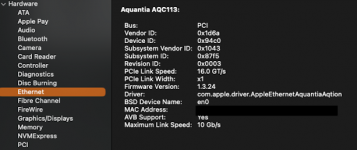
Which BSSID does your Aquantia NIC use, i.e. en0, en1, en2 etc.

Does the Aquantia NIC show up on the System Information > Ethernet report?

Screenshot 2025-08-11 at 22.16.14.png Example of System Information > Ethernet report for AQC107 10G NIC (card in the Intel system I am currently using).
 
No, you don''t need to reflect the other ID's in the SSDT. In fact I think yours is one that doesn't need the SSDT.

With Device ID 0x94C0 already set. you don't need the SSDT. As that is one of the main things it aims to fix.

I am assuming this is you running your system without the SSDT being in place.

Which BSSID does your Aquantia NIC use, i.e. en0, en1, en2 etc.

Does the Aquantia NIC show up on the System Information > Ethernet report?

View attachment 17778 Example of System Information > Ethernet report for AQC107 10G NIC (card in the Intel system I am currently using).

Yes, the Hackintool screenshot was taken when not using the SSDT.

I can see the NIC in the System Report, please take a look at the attached image. The BSSID is en0.

In Sonoma, I have been using the Aquantia NIC without any SSDTs nor kexts. It worked out of the box.

But I think there is a deeper problem with my system, because not only does the NIC not work (in Settings > Networking > Ethernet, I see "Self-assigned IP", so the NIC is unable to negotiate an IP address with the DHCP server), but the system does not recognize my SATA drives (better said, the disks do appear in Disk Utility as "Media [Uninitialized]" with capacity of "Zero KB", Partition Map: Not Supported, etc).

I created a bootable Sonoma recovery USB thumb drive with the exact same EFI as I use for my real system. The bootable recovery Sonoma system could see all my drives (even the SATA ones) and had no issues with additional connected USB devices.

However, when I created a Sequoia bootable recovery USB flashdisk, the recovery system displayed the rainbow spinning wheel and then switched to a black screen with progressbar and Apple logo (as if booting was in progress during a Mac startup). I guess the Sequoia recovery system froze because the system was booted from an external USB thumb drive (so the keyboard and mouse stopped working like in my real system).

Does anyone actually have a running Sequoia 15.6 system with publicly available EFIs (or just config.plist)? I wonder if the problem is in my EFI or in the 15.6 update...


aq.png
 
Disable ‘AVB’ support in macOS.
  1. Click on the 10G Ethernet connection in the System Settings > Network tab.
  2. Select the ‘Details’ button.
  3. Navigate to the ‘Hardware’ tab
  4. Unselect the AVB option .
See if that helps.
 
Disable ‘AVB’ support in macOS.
  1. Click on the 10G Ethernet connection in the System Settings > Network tab.
  2. Select the ‘Details’ button.
  3. Navigate to the ‘Hardware’ tab
  4. Unselect the AVB option .
See if that helps.

I don't think it helped, this is what I did:
  1. Turn off PC.
  2. Unplug the Ethernet cable.
  3. Boot into Sequoia.
  4. Settings > Network > Ethernet > Details > Hardware > [manual controls] > disabled AVB.
  5. Connect the Ethernet cable.
  6. After a few seconds, I saw "Self-assigned IP" again.
 
After changing the AVB setting, did you reboot the system?

You might also need to use the ResetNvram option from the OC boot screen.

If these don't help, it would be best to Enable AVB for your setup.
 
After changing the AVB setting, did you reboot the system?

You might also need to use the ResetNvram option from the OC boot screen.

If these don't help, it would be best to Enable AVB for your setup.

I did reset NVRAM twice, but it did not help. I think there is a deeper problem with my setup, because even if the Aquantia would work, there is still the issue with Sequoia not recognizing any SATA disks (no problems with SATA on Sonoma).
 
That sounds like an issue with the SATA kext in Sequoia, but could be an issue with the Bios for the ProArt board.

Have you compared the SATA configuration in Sonoma to the setup in Sequoia, i.e. checked which kexts are loading in each OS, that the same kexts are loading and that they contain the same Device ID's etc.

Also do both OS's recognise the SATA PCIe device in your IOReg and Hackintool's PCIe tab?

I recall a similar SATA issue with a Gigabyte board running Sequoia (X570 Board). Where the SATA drives weren't recognised or active. But my Asus X570 board with the same SATA controller and Device ID worked without any issues. Boiled down to an issue in the Bios, if I recall correctly.

Did you upgrade the motherboard Bios before or after installing Sequoia?
 
  AdBlock Detected
Sure, ad-blocking software does a great job at blocking ads, but it also blocks some useful and important features of our website. For the best possible site experience please take a moment to disable your AdBlocker.