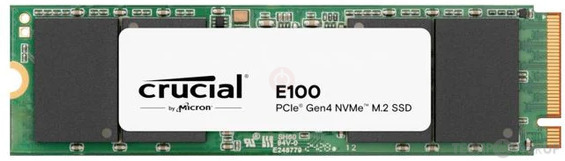
While you motherboard, CPU and discrete GPU are all compatible with the AMD Vanilla process, your Crucial NVME SSD isn't. It uses a Silicon Motion Controller, which is known to be problematic when used as a macOS Boot drive.
Do you have an alternative drive you can use for macOS, preferably one that is compatible with macOS, i.e. older Gen3 and Gen4 Western Digital or SanDisk are normally the best options for use as a macOS boot drive.
corpnewt has 99 repositories available. Follow their code on GitHub.
github.com
Have you created a Debug version of the OpenCore EFI folder? So you can obtain the MmioWhitelist entries for your system, this is essential if you are to get Tahoe running on your system.
v1.0.7 Improved XhciPortLimit compatibility with macOS Tahoe, thx @laobamac Updated builtin firmware versions for SMBIOS and the rest Migrated to edk2-stable202511
github.com
Have you created a UTBMap.kext for your USB ports with USBToolBox Tool in Windows?
the USBToolBox tool. Contribute to USBToolBox/tool development by creating an account on GitHub.
github.com
Were you aware that the AMD 800-series of motherboards can be problematic when it comes to installing macOS, specifically Tahoe, as it has some peculiar requirements when being installed.
Have you thought of installing Sequoia first and then updating to Tahoe, just to make sure your system will comfortably run macOS.
Booting Windows and macOS from the same drive isn't a great idea, especially for someone new to AMD Hackintosh setups. Also the best process for doing as you plan is to install macOS first, and then add Windows to a separate Partition on the drive. The reasoning behind this is that the EFI partition needs to be the first (hidden) partition on the drive for macOS to boot. Windows doesn't have the same requirement.
As to your UTBMap.kext, are you aware that it isn't compatible with macOS Tahoe. It will work perfectly well with Sequoia or an older version of macOS, but not with Tahoe. Apple made some changes to the naming conventions used for USB ports and connector types, which UTBMap doesn't include. Installing Sequoia for example would allow you to generate another USB kext such as USBMap.kext or USBPorts.kext that is compatible with Tahoe.
When creating an EFI for Tahoe you need to keep the /EFI/OC/Kexts folder contents to a minimum, as some non-essential kexts are known to cause boot issues and kernel panics when included in the OC setup. This includes WhateverGreen.kext / NootedRed.kext / NootRX.kext I.e. the graphics kext all of which need to either be removed or disabled before attempting to install Tahoe. They can be added back or enabled once macOS Tahoe has completed the installation.
Apple removed AppleHDA.kext from macOS Tahoe, as none of their retained Intel systems use the old Audio kext. What this means for most Hackintosh systems is that the built-in Realtek Audio Codec won't work with AppleALC.kext as would be expected. AppleHDA.kext needs to be added back in to Tahoe as a post-installation process before you will get your Audio working. USB audio codecs don't have the same issue, they will usually work out of the box (OOB) with no additional kexts required.
Nie jestem w tym do końca obeznany, ale udało mi się to kiedyś zrobić, używając innych komponentów. AM5 wydaje się być poza moim zasięgiem. Być może będę musiał poszukać pomocy z zewnątrz, żeby ktoś zbudował mój EFI i plik config.plist od początku do końca, w oparciu o wspomniane przeze mnie komponenty.
This site uses cookies to help personalise content, tailor your experience and to keep you logged in if you register.
By continuing to use this site, you are consenting to our use of cookies.
Sure, ad-blocking software does a great job at blocking ads, but it also blocks some useful and important features of our website. For the best possible site experience please take a moment to disable your AdBlocker.