I've been using Big Sur for a while now with no issues. I created my EFI through the Dortania guide & almost everything works perfectly. I tried updating to Monterey & I'm stuck on this, I'd appreciate any help on how to get past this issue. (The EFI works perfectly on Big Sur)
Specs:
MacPro7,1
Mobo: Asus TUF Gaming X570-Pro WiFi II
RAM: Corsair Dominator 24GB
GPU: Radeon RX580 8GB
Drive: Samsung 870 SSD 256GB
WiFi: Intel Ax210 WiFi 6E
macOS Big Sur 11.7.1
Why are you using FakeSMC.kext and not VirtualSMC.kext? Did you have issues booting macOS when using VirtualSMC.kext?
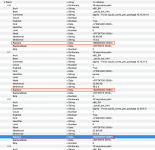
You haven't changed the 3rd Kernel Patch to match your 6-core CPU. The 1st and 2nd patches have been edited, but not the third, which relates to Monterey (12.0) and Ventura (13.0). This missing edit may be the cause of your issues.
Current AMD Kernel Patch entries (1st three patches)
Revise AMD Kernel Patch entries (1st three patches)
I have attached a cleaned up config.plist for you to try. See if this revised config.plist works with your current OC EFI.
Why are you using FakeSMC.kext and not VirtualSMC.kext? Did you have issues booting macOS when using VirtualSMC.kext?
You haven't changed the 3rd Kernel Patch to match your 6-core CPU. The 1st and 2nd patches have been edited, but not the third, which relates to Monterey (12.0) and Ventura (13.0). This missing edit may be the cause of your issues.
I can't remember the exact panic I was getting before switching to FakeSMC, but VirtualSMC just wouldn't boot into macOS. However I got it to work yesterday by cleaning up my kexts.(Also didn't note which kexts gave me a problem.) Let me try again with the config.
This site uses cookies to help personalise content, tailor your experience and to keep you logged in if you register.
By continuing to use this site, you are consenting to our use of cookies.
Sure, ad-blocking software does a great job at blocking ads, but it also blocks some useful and important features of our website. For the best possible site experience please take a moment to disable your AdBlocker.



 drive.google.com