
Error during installation - Kernel panic !?

Who_Am_I

New member
AMD OS X Member
Jan 14, 2026
2
0
1
CPU:
Ryzen 5600G
I have a desktop with AMD Ryzen 5600G (no graphics card), Motherboard Gigabyte B450MDS3H V2. Tried the Opencore method to dual boot MacOS & Windows 11 and getting the below kernal panic
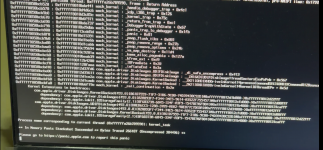
1768402662259.png

I have also tried the Olarila vanila image dual boot install using youtube video guide (
) but getting the error
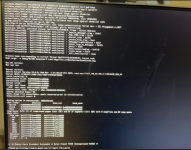
1768402696810.png
Also, while USB port detection I got this message which I didn't see on any tutorial videos. I've tried both Ignore & Disable options but the result is the same.
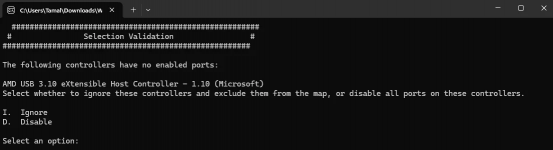
1768402734958.png
Can anyone help ?!
 
Post a copy of the EFI folder you are using so we can see what might need attention.

When dual booting macOS and Windows it is usually best to have each OS on a separate drive/SSD/NVMe is that the case in this instance?

It is also advisable to remove any Window or Data drives from the system while installing macOS, as it lessens the chance of unnecessary issues or formatting the wrong drive, which happens more often than you might expect.
 
Here is a copy of the EFI folder.

Regarding
When dual booting macOS and Windows it is usually best to have each OS on a separate drive/SSD/NVMe is that the case in this instance?
I have not yet reached the stage where I get to choose the drive/SSD/NVMe where I wish to install the macOS the error occurs before I can even see the Apple logo. However my Windows 11 is installed on a NVMe SSD and I have created a separate partition in the same SSD where I wish to install macOS.
 

Attachments

Have you set your bios as recommended in the Dortania Ryzen guide?


I am specifically interested to know if you have enabled Above 4G Decoding, as this is an essential setting, which if not enabled requires the addition of a Boot Argument in the config.plist (npci=0x3000). One or the other needs to be used, never both.

When using NootedRed.kext it is imperative that you not use any DeviceProperties in your config.plist. As these are known to cause issues with NootedRed.kext and NootRX.kext.
I have removed the DeviceProperties from your config.plist, not knowing what the first two are set to show as 'Builtin' I have not made any allowances for these entries. The third is the layout-ID for your Audio, so I have added alcid=98 to the boot arguments to deal with this entry.

I have gone through your config.plist and cleaned it up a little.
I have removed a few unnecessary kexts - BlueToolFixup.kext, CtlnaAHCIPort.kext. USBToolBox.kext and UTBDefault.kext as these kexts do nothing for your system during the installation process.
I have re-ordered the remaining kexts to best suit an AMD Hack

Non-natively supported Bluetooth devices require more than just BlueToolFixup.kext for the bluetooth device to work in macOS.
UTBDefault.kext does nothing, as it has an empty/blank info.plist.
CtlnaAHCIPort.kext is an Intel specific kext, it does nothing on an AMD system, and provides a purely cosmetic fix.

Try this revised EFI, see if it gets you any further.
 

Attachments

  AdBlock Detected
Sure, ad-blocking software does a great job at blocking ads, but it also blocks some useful and important features of our website. For the best possible site experience please take a moment to disable your AdBlocker.