First thing of note is that when using NootedRed.kext is that you shouldn't be adding any DeviceProperties to your config.plist. So I would recommend you delete and replace the two entries in the DeviceProperties section of your config.plist with a compatible Boot Argument (alcid=12).

Remove DeviceProperties
You have three USB kexts in your /EFI/OC/Kexts folder.
- USBMap.kext
- USBMap.kext is configured to work with a MacBookPro 16,3 SMBIOS. This kext has not been updated for Tahoe, just as well it is not being used.
- USBPorts.kext
- USBPorts.kext is configured to work with a MacBookPro 16,2 SMBIOS. This kext has been updated for Tahoe, but is not enabled in your OC setup.
- UTBMap.kext & USBToolBox.kext
- UTBMap.kext is not SMBIOS specific, but it is also not supported in macOS Tahoe, even though you have enabled it in your OC setup.
I would recommend changing the kext you are using to USBPorts.kext, with a few minor edits to the info.plist so it works with MAcBookPro16,4 SMBIOS.
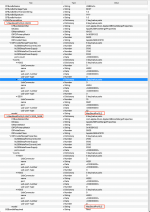
Current USBPorts.kext/Contents/Info.plist with SMBIOS errors highlighted
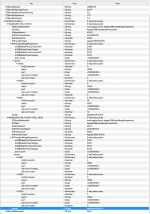
Edited USBPorts.kext/Contents/Info.plist with SMBIOS errors corrected to read as MacBookPro16,4.
You need to clean up your Kexts folder and only have those kexts you are using present in your setup.
For example you have two BatteryManager kexts
- SMCBatteryManager.kext - Enabled
- ACPIBatteryManager.kext - Disabled
Remove the Disabled/unused kext.
I would expect that as you are using OCLP-Mod or OCLP-PLUS that you would have AMFIPass.kext enabled to go with the other OCLP kexts.
Your current Boot Arg entries look like this.
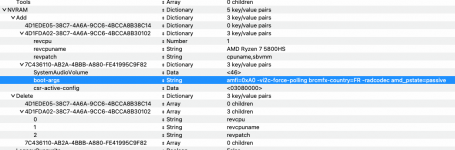
I would recommend adding a single Boot Arg to this list to deal with the DeviceProperties that were removed.
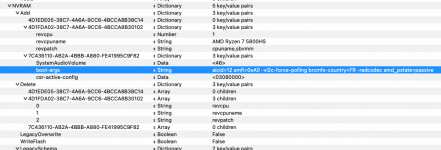
alcid=12 added to list of boot args.
You currently have the MacBookPro16,2 SMBIOS data in your config.plist. This should be replaced with the SMBIOS for a MacBookPro16,4 system.
I would recommend that you clean up your Drivers and Tools folder content, so they match the entries in your config.plist and only those that are being used/Enabled.
Try the revised EFI attached below, see if that gets your system booting.

