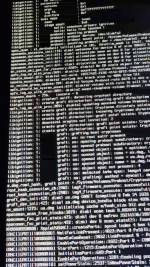
Hi there! I'm trying to configure OpenCore for this hardware:
MSI GAMING B650 PLUS WI-FI / AMD Ryzen 7 7700 / ASUS Radeon RX 6600 / ADATA Technology Co., Ltd. LEGEND 960 NVMe SSD
I tried building a config following Dortania, and it does not boot at all (after prelinked kernel stage I instantly get prohibited sign). I doubt
it's an issue with USB. It seems like there's some problem with SMBIOS (again, it happens the same moment prelinked kernel ends loading),
but I chose
Then I downloaded a config for a similar mobo (it also has the B650 chipset). Removed the kexts I don't need (the ones that were there for
another Wi-Fi module), changed it a bit for my needs. I've got the BaseSystem.dmg loaded, and the first install stage has finished
successfully. After a couple of reboots an Apple logo with the progress bar and ETA shows up, but then it just bootloops.
By trial and error I've come to conclusion that it's an NVMe issue (i.e.,
which is to be expected as it can't mount / then).
I've tried:
Thanks in advance
MSI GAMING B650 PLUS WI-FI / AMD Ryzen 7 7700 / ASUS Radeon RX 6600 / ADATA Technology Co., Ltd. LEGEND 960 NVMe SSD
I tried building a config following Dortania, and it does not boot at all (after prelinked kernel stage I instantly get prohibited sign). I doubt
it's an issue with USB. It seems like there's some problem with SMBIOS (again, it happens the same moment prelinked kernel ends loading),
but I chose
MacPro7,1, so it should be okayThen I downloaded a config for a similar mobo (it also has the B650 chipset). Removed the kexts I don't need (the ones that were there for
another Wi-Fi module), changed it a bit for my needs. I've got the BaseSystem.dmg loaded, and the first install stage has finished
successfully. After a couple of reboots an Apple logo with the progress bar and ETA shows up, but then it just bootloops.
By trial and error I've come to conclusion that it's an NVMe issue (i.e.,
nvme=-1 boot argument changes things. I get Still waiting for root device,which is to be expected as it can't mount / then).
I've tried:
-
nvme=0,nvme=1,nvme=-1 - switching M2 from Gen 4 to Gen 3 in BIOS (I have a Gen 4 SSD)
- disabling NVMeFix.kext
-
nvme_core.default_ps_max_latency_us=0 - disabling/enabling ReBAR & Above 4G decoding
- moving NVMeFix.kext a bit upper in the kext load order
- resetting NVRAM
- installing Ventura/Sonoma/Sequoia
msi9 is my initial config, and config2 is the one I got on GitHub and modified a bit. I also attached the picture that shows the last lines I get in Verbose Mode before the system reboots.Thanks in advance