After stop using osx for a while, updated opencore, now boots on verbose, desktop not shown.

divarak

New member
AMD OS X Member
Jun 4, 2020
19
4
3
Hello Everybody. Using opencore 1.0.4 with Sequoia, after some time not using OSX decided to update opencore... After that the boot progress bar was stuck.. On verbose.. well, I post pictures. Tried to use some sanity checker, upgrade kexts, but can't find what the point where I messed it up. Something I noticed is that the system booted to the desktop, but doesn't show on screen, the utility of my keyboard recognizes the light profile of the keys, I have sound, but no image showing the desktop.
Please help.


CPU
Intel Xeon E5 2699 v3 @ 2.30GHz 30 °C
Haswell-E/EP 22nm Technology
RAM
64,0GB Unknown @ 1064MHz (15-15-15-36)
Motherboard
MACHINIST X99-MR9A PRO MAX (SOCKET 0) 49 °C
Graphics
DELL P2417H (1920x1080@60Hz)
Acer XF240H (1920x1080@144Hz)
8176MB ATI AMD Radeon RX 6600 XT (Unknown)

 

Attachments

  • 1780273539193.jpg
    1780273539193.jpg
    3.3 MB · Views: 2
You need to provide a copy of the EFI folder you are using to boot your Haswell-E system, before anyone can help you.

Just remember to delete the Serial Number and other SMBIOS data (MLB, ROM & SystemUUID) from your config.plist before posting a copy of your EFI here.

Black screen with an RX 6600 (XT) graphics card is normally fixed by adding ‘agdpmod=pikera’ boot argument to the config.plist.
 
Sorry, for some reason the efi zip didn't upload and didn't check the post. Here it is.
The agdpmod=pikera setting was already present.
 

Attachments

I will have a look at this when I am at my desk later today.
 
No, I got side tracked with a couple of other things and family life. I will definitely have a look at the folder tomorrow.
 
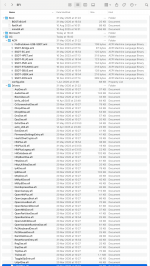
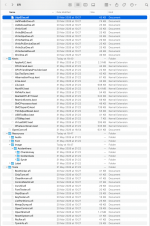
Your EFI folder is a mess. You have mixed the drivers, tools and the main BootX64.efi and OpenCore.efi from a number of OpenCore releases.

Screenshot 2026-06-08 at 19.04.27.png Screenshot 2026-06-08 at 19.05.03.png screenshots showing the contents of your EFI folder!

As you are using NootRX.kext for your RX6600 XT you don't need the agdpmod=pikera boot argument, it is included in the kext. You should also remove WhateverGreen.kext if you are using NootRX.kext.

Where did you get the SSDT's in your ACPI folder?
Did you create them using your system DSDT.aml?

Your USB configuration is also a mess. You should be using SSDT-EHxx-OFF.aml so the EHC1 & EHC2 ports are pushed to the XHC controller and those two old/obsolete controllers are not used.
I assume the ports under the 8.0.0 USB controller are from a third-party PCIe card you have installed in the case.

How many other OS's do you have in this Haswell-E system?
Can you boot in to the other OS's without any issues?
Do you use OpenCore GUI to select the other OS boot option?

Short of building a completely new EFI folder I am not sure how to help you.
 
Thanks again for your time to help me. I tried to rebuild the EFI with Opencore Simplify, make the replacements, but didn't clean leftover files.
Honestly, a few years ago couldn't follow the dortania guide and fully understand it when do something, and when do not.
I receive some help with specific issues until it booted, then didn't take too much care. My bad.
I'll rebuild the EFI from scratch, paying more attention to the guide.


About details:
Understood about remove boot argument and whatevergreen.

The ACPI was build with a tool that runs on linux, never worked well on windows.
Will look to older usb config I had, that was working pretty well.
I have OSX, linux and windows on this machine. All boot correctly except OSX
I am using Opencore to boot the other systems and no problems.
About USB external, yes, there is a Fresco logic FL1100 present.
 
  AdBlock Detected
Sure, ad-blocking software does a great job at blocking ads, but it also blocks some useful and important features of our website. For the best possible site experience please take a moment to disable your AdBlocker.