
Hi,
I'm working with Claude to try to build this:
CPU: AMD Ryzen 7 9800X3D
Motherboard: Gigabyte X870E AORUS Elite WiFi7 (ATX, AM5)
GPU (temporary): XFX RX 570 4GB — in primary PCIe x16 slot for build phase
GPU1 (gaming): ZOTAC RTX 5090 SOLID 32GB — removed during build phase, needs SSDT to hide from macOS laterGPU (macOS):
GPU2: PowerColor Red Devil RX 6900 XT 16GB (Device ID 0x73BF) — will go in AOOSTAR AG02 eGPU dock eventually
RAM: 2 x 48GB DDR5 Corsair Vengeance — not yet purchased
Case: be quiet! Dark Base Pro 900 v1
PSU: Corsair HXi 1200W ATX 3.0
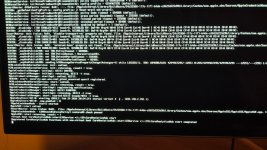
I'm not very far in to be honest. It's hanging at the place shown in the attached photo when booting from the USB. I haven't yet reached the start point of the install. I've attached the EFI here.
I've tried:
Any ideas where I'm going wrong?
Thanks in advance!
I'm working with Claude to try to build this:
CPU: AMD Ryzen 7 9800X3D
Motherboard: Gigabyte X870E AORUS Elite WiFi7 (ATX, AM5)
GPU (temporary): XFX RX 570 4GB — in primary PCIe x16 slot for build phase
GPU1 (gaming): ZOTAC RTX 5090 SOLID 32GB — removed during build phase, needs SSDT to hide from macOS laterGPU (macOS):
GPU2: PowerColor Red Devil RX 6900 XT 16GB (Device ID 0x73BF) — will go in AOOSTAR AG02 eGPU dock eventually
RAM: 2 x 48GB DDR5 Corsair Vengeance — not yet purchased
Case: be quiet! Dark Base Pro 900 v1
PSU: Corsair HXi 1200W ATX 3.0
I'm not very far in to be honest. It's hanging at the place shown in the attached photo when booting from the USB. I haven't yet reached the start point of the install. I've attached the EFI here.
I've tried:
- SetupVirtualMap → false (AM5 requirement per mikigal README)
- SecureBootModel → Disabled
- DmgLoading → Any
- AM5 PCI bus enumeration fix → enabled
- DevirtualiseMmio → true then reverted to false
- EnableWriteUnprotector → true
- ProtectUefiServices → true
- DisableIoMapper → true
- csr-active-config → 03000000
- boot-args additions: agdpmod=pikera, amfi_get_out_of_my_way=1, revpatch=sbvmm, npci=0x2000
- Updated OpenCore from 1.0.4 to 1.0.7
- Bypassed KVM, plugged keyboard directly
- Tried USB 2.0 port
Any ideas where I'm going wrong?
Thanks in advance!
Attachments
Last edited:


