Update stuck

KieranWaugh

New member
AMD OS X Member
Jun 3, 2020
14
1
3
3
Glasgow, Scotland
CPU:
Ryzen 5 1400
Hi everyone,

I decided to update my stable Catalina build to Big Sur, I’ve updated the patches to the experimental one (i think thats correct) and updated to open core 0.63. When booting macOS installer it gets stuck on “AMDCPUSupport:start Family 17h, Model 01h” and the installer goes no further. I can still boot into Catalina and all is fine.

Edit: it also occasionally get stuck on one line after saying “pci (build 00:20:21 Oct 31 2020), flags 0x20c1080”

Any ideas on how to resolve this?

Cheers
 
Last edited:
You can use latest stable patches. Did you rebuild your config when updating it ? Try restarting from scratch using dortonia guide. That always fixed my problems. I tried some tools, but they’re not as good as the guide. Try sanity checker after that.
 
Last edited:
I'll try the latest stable patch too. I updated my config (using the guide) and updated to OC 0.63. The sanity checked shows no issues also.

I have attached my EFI folder
 

Attachments

  • Like
Reactions: Carniphage
I'll try the latest stable patch too. I updated my config (using the guide) and updated to OC 0.63. The sanity checked shows no issues also.

I have attached my EFI folder
I am still stuck at the same point. Having tried a bunch of config.plist changes.
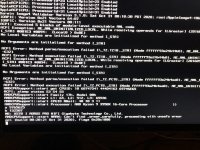
Occasionally, the log gets a few lines further and you see this. (attachement)


"WRMSR" refers to Write to Model Specific Register. Does this make sense to anyone?


IMG_2169.jpeg
 
I am still stuck at the same point. Having tried a bunch of config.plist changes.
Occasionally, the log gets a few lines further and you see this. (attachement)


"WRMSR" refers to Write to Model Specific Register. Does this make sense to anyone?


View attachment 1780
Managed to fix it by replacing all my kext files and re adding by OC snapshot. I'm guessing there was an issue with an older one. Hopefully it works for you too.
 
  • Like
Reactions: Carniphage
  AdBlock Detected
Sure, ad-blocking software does a great job at blocking ads, but it also blocks some useful and important features of our website. For the best possible site experience please take a moment to disable your AdBlocker.