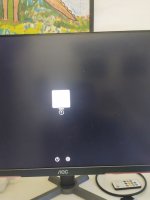
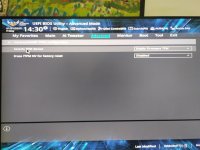
Help me please. Ventura OS ryzen 7 5700x

gouvea-js

New member
AMD OS X Member
Jan 31, 2025
28
0
1
CPU:
Ryzen 7 5700x / b450m / rx 6600
Hello everyone, I've been for 3 days, almost without sleep studying and trying, and racking my brains, I just don't know what else to do, if not for kernel panic, for viso support apple, I'm really losing my hair, and no and something aesthetic, I joined as a junior IOS programmer, and the company only has a Mac, if I want to study or code, I have to wait for my service time, please help me.

IOS : Ventura

IMG_20250131_115049730_HDR.jpgIMG_20250131_115230653.jpg
 

Attachments

Last edited:
Hello everyone, I've been for 3 days, almost without sleep studying and trying, and racking my brains, I just don't know what else to do, if not for kernel panic, for viso support apple, I'm really losing my hair, and no and something aesthetic, I joined as a junior IOS programmer, and the company only has a Mac, if I want to study or code, I have to wait for my service time, please help me.

IOS : Ventura

View attachment 16188View attachment 16189
1738339263852.png
both this are not useful for your motherboard and CPU (is B450 tuf gaming as your log say?)
GPU?
is Bios well configured?
UEFI on CSM Off and 4G on?
Serial port (if available disabled)?
 
  • Like
Reactions: gouvea-js
View attachment 16192
ambos não são úteis para sua placa-mãe e CPU (o B450 é um ótimo jogo para jogos, como diz seu registro?)
Placa de vídeo?
O Bios está bem configurado?
UEFI com CSM desligado e 4G ligado?
Porta serial (se disponível desabilitada)?


primeiramente muito obrigado, por disponibilizar seu tempo livre e me ajudar, agradeço muito, BIOS bem configurado, 4g desabilitado pois estou usando npci=0x3000, mas posso mudar se quiser, vou desabilitar isso e testar, estou fazendo vários testes e agora isso me dá um erro, mas vou tentar o que você me falou e postou novamente .

error : bep : invalid revision 5, halting on critical error
 
View attachment 16192
both this are not useful for your motherboard and CPU (is B450 tuf gaming as your log say?)
GPU?
is Bios well configured?
UEFI on CSM Off and 4G on?
Serial port (if available disabled)?

I managed to fix the error : bep : invalid revision 5, halting on critical error, they were outdated drivers. now it opens a bunch of lists, and after the black screen.
 

Attachments

Last edited:
I changed plans, I'm trying to install the latest macOS, but now I get this error , I'm losing expectations, I see several people with almost the same configurations as mine and even so mine doesn't work :(
 

Attachments

You need to clarify which motherboard you are using and the Graphics card make and model, so we have a better idea of the main components in your system.
 
Você precisa esclarecer qual placa-mãe está usando e a marca e o modelo da placa de vídeo, para que tenhamos uma ideia melhor dos principais componentes do seu sistema.
Thank you very much for what you are doing for me, you will be rewarded.

I can an XFX Radeon 6600 8gb

An Asus TUF Gaming b450m pro 2 mobo

I can use Realtek as my internet provider, I also have a Wi-Fi/B, which I can configure or remove so that it works when I go through the dilemma of installing the Mac, I believe that this is not the problem, in this answer I will put it to you are the config that I use that gives me these errors, in the other answer I included what is being tested now, I certainly need to stop tinkering a little, I'm several days away, I sold my RTX 3060ti to get this product so I can run Mac to be able to develop native applications, and unfortunately I just wasted money and time, thank you very much for your attention
 

Attachments

Last edited:
I have (possibly) provided an answer to this issue in the other thread.

Do you have an RX6600 or an RX 6700 graphics card?

The EFI I posted in the other thread is set for an RX 6700, as that is what you said you were using!
 
Here is an EFI that will work with an RX 6600 but not an RX 6700 dGPU.
 

Attachments

I apologize for the mistake, I have the 6600, it worked up to a certain point, in the bios there was something called opecore, I clicked on it, then a Windows SSD appears, I click and it starts Windows, and nothing else, thank you very much, okay? I'm helping a lot
Here is an EFI that will work with an RX 6600 but not an RX 6700 dGPU.
 

Attachments

  • IMG_20250131_192416760.jpg
    IMG_20250131_192416760.jpg
    1.8 MB · Views: 8
How have you created your macOS USB installer?

The Off-line 'Install macOS xxxx' icon should show to the right of the Windows icon, if you have created the USB installer correctly.

Try pressing the 'Spacebar' while you are on the OC boot screen, to unhide any auxiliary tools and icons.

The Recovery icon should show up, if that is what you are using to install macOS.
 
Como você criou seu instalador USB do macOS?

O ícone 'Instalar macOS xxxx' off-line deve aparecer à direita do ícone do Windows, se você tiver criado o instalador USB corretamente.

Tente iniciar a "Barra de espaço" enquanto estiver na tela de inicialização do OC para exibir todas as ferramentas e ícones auxiliares.

O ícone de recuperação deve aparecer, se for o que você está usando para instalar o macOS.

Consegui isso através do "espaço", porém, quando escolho a opção de imagem, aparece uma tela preta e depois um kernel panic, a mesma coisa que aconteceu antes, mas com essa interface, vendo com animação que vamos conseguir, você é uma fera , vou enviar como foto,

Normal, método Dortania, só joguei os arquivos, junto com o recovery, pen drive formatado com fat32 não buttable, siga os passos passo a passo,

Na minha imagem estou usando o novo Mac, pois estava testando, se quiser posso colocar o Ventura
 

Attachments

  • IMG_20250131_193523160_PORTRAIT.jpg
    IMG_20250131_193523160_PORTRAIT.jpg
    2.5 MB · Views: 5
  • IMG_20250131_193629666_PORTRAIT.jpg
    IMG_20250131_193629666_PORTRAIT.jpg
    1.5 MB · Views: 6
  • IMG_20250131_193105114_HDR.jpg
    IMG_20250131_193105114_HDR.jpg
    1.2 MB · Views: 5
  • IMG_20250131_193053580_HDR.jpg
    IMG_20250131_193053580_HDR.jpg
    2.5 MB · Views: 5
  • IMG_20250131_193039600_HDR.jpg
    IMG_20250131_193039600_HDR.jpg
    1.5 MB · Views: 4
  • IMG_20250131_193021703_HDR.jpg
    IMG_20250131_193021703_HDR.jpg
    1.6 MB · Views: 4
  • IMG_20250131_193004552.jpg
    IMG_20250131_193004552.jpg
    1.3 MB · Views: 4
  • IMG_20250131_192956934.jpg
    IMG_20250131_192956934.jpg
    2.4 MB · Views: 10
The version of macOS you are trying to install shouldn't make a difference. The EFI will support the installation of Big Sur through to Sequoia.

You should use the 'ResetNVRAM' entry, not the 'CleanNvram' entry to reset NVRAM on your system. If you use the 'ClearNvram' option you need to select 'ResetSystem' option immediately after, as the system needs to be rebooted to actually clear any old entries from the system NVRAM.

I have no idea why the macOS Recovery icon is not showing. Best you go and look through how you created your USB installer and do it again.
 
How long are you leaving the system to run when you see the text in the first photo in post #13?

You may need to just leave the system to run for a while as it may get over this disk mounting issue by itself.

It would be much better if you were using a clean drive that didn't contain any data or another OS as your macOS boot drive. Even a small (256GB) SSD would be better than using the same drive you have installed Windows.
 
How long are you leaving the system to run when you see the text in the first photo in post #13?

You may need to just leave the system to run for a while as it may get over this disk mounting issue by itself.

It would be much better if you were using a clean drive that didn't contain any data or another OS as your macOS boot drive. Even a small (256GB) SSD would be better than using the same drive you have installed Windows.
Brother, you saved my life, both my career and my sanity, everything went well, after I put Ventura as an img, it worked, it installed now and I'm already talking about it, I wanted to know how I can remove that plugin that you said I need to remove to have graphic acceleration, everything worked right away, sound, b, mouse, keyboard, very good, I installed it on a different SSD than Windows, if something went wrong I could still ask for help, can I use the same pendrive to delete Windows and maybe put a more recent Mac? I really appreciate the full attention you gave me.
 
If there were also applications that I could download to see if everything is running well, if the processor is giving its best, card, etc., because I kind of feel a lag, but nothing worrying that I think can be solved, I also don't know if it's because it's on a generic SSD, if you say that I can put it on the nvme without any problems, tonight I'll leave it installing there and then I'll format this one
 
I have no idea how it happened, I simply put Ventura, what appeared in the image of lines of code appeared, it restarted and soon entered to install the Mac lol I don't know how you did it quickly, I had been almost without sleep for 3 days to be able to do this
 
How long are you leaving the system to run when you see the text in the first photo in post #13?

You may need to just leave the system to run for a while as it may get over this disk mounting issue by itself.

It would be much better if you were using a clean drive that didn't contain any data or another OS as your macOS boot drive. Even a small (256GB) SSD would be better than using the same drive you have installed Windows.
Good morning, how could I activate root? Would I have to download it and play it in the nvme hard drive folder?
 
Good morning, how could I activate root? Would I have to download it and play it in the nvme hard drive folder?
Not sure what you are asking. Can you explain a bit more about what you are trying to do.
 
  AdBlock Detected
Sure, ad-blocking software does a great job at blocking ads, but it also blocks some useful and important features of our website. For the best possible site experience please take a moment to disable your AdBlocker.