Hi, I can't log in to FaceTime. You can log in to iMessage, but you will automatically log out later. ICloud can be used normally. I've tried many times to change SMBIOSI and clear NVRAM. Moreover, I have built in the MAC address en0, and try to use a new account, and the problem still exists. Can you help solve this problem? Thank you (all other functions are normal)
Having the Ethernet set as something other than en0, i.e. having the WiFi set as en0 so the Ethernet port is en1, or en2 will often cause this issue. The only sure way to fix this issue is a clean installation of macOS. Using the CleanNvram tool or ResetNvramEntry driver from the OC boot screen will not fix this issue. Before Big Sur was released it was possible to delete the Networking.plist and resolve this issue. But with the changes Apple have made to the OS this no longer works.
So you may need to run a CLEAN installation of Ventura using a completely new iMac20,1 SMBIOS, to get over this issue. Assuming this is related to the Comet Lake system listed in your signature.
Did you use Corpnewt's GenSMBIOS script to generate your iMac20,1 SMBIOS?
You need to use the MLB, ROM and SystemUUID plus the Serial Number from the same SMBIOS to get the Apple services working correctly.
You have already done the hard part, creating a working OpenCore EFI Folder. All you need to do is edit the SMBIOS data to a newly generated iMac20,1 SMBIOS. Add the revised EFI to the EFI partition on a USB pen drive with Ventura restored to the main/visible partition and use this to Erase your WD SN770 NVME drive before installing Ventura again.
I'm a novice and don't quite understand. You mean setting WIFI to en0 and Ethernet to en1 or en2, and then installing a brand-new Ventura with the regenerated SMBIOS data? I tried to install a new Ventura with a new SMBIOS, but the problem still exists.
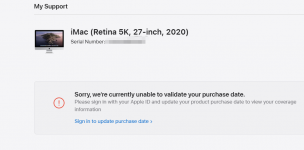
The following figure is the result of my query on SMBIOS data in official website, Apple: (Your purchase date can't be verified at present), can I use this SMBIOS? Please check the attachment and help me check if there is anything wrong with EFI.
That message means you need to use a different Serial Number in your config.plist. Because the one you are using is already in use by a real Mac or has been activated on the Apple server by another Hack.
Use Corpnewt’s GenSMBIOS to generate a new SMBIOS.
This site uses cookies to help personalise content, tailor your experience and to keep you logged in if you register.
By continuing to use this site, you are consenting to our use of cookies.
Sure, ad-blocking software does a great job at blocking ads, but it also blocks some useful and important features of our website. For the best possible site experience please take a moment to disable your AdBlocker.