
Hi everyone, I’m new to Hackintosh.
I recently upgraded my CPU from a 3700X to a 5900XT.
I’ve spent the past month of my free time trying to install macOS Monterey,
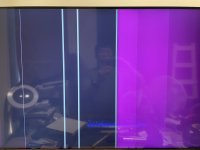
but I keep running into issues — either I get stuck on this screen or the system crashes completely.
For some reason, this has even started affecting my other Windows system, and I have no idea why.
I’ve attached my OpenCore folder and a screenshot of the issue.
Here are my hardware specs:
I’ve also included my EFI and OpenCore files.
Any help from the community would be greatly appreciated.
Thanks so much for taking the time to help me out!
===============
I’ve found a solution. it is my misstake
I recently upgraded my CPU from a 3700X to a 5900XT.
I’ve spent the past month of my free time trying to install macOS Monterey,
but I keep running into issues — either I get stuck on this screen or the system crashes completely.
For some reason, this has even started affecting my other Windows system, and I have no idea why.
I’ve attached my OpenCore folder and a screenshot of the issue.
Here are my hardware specs:
- CPU: Ryzen 5900XT
- Motherboard: Gigabyte X570 AORUS ELITE
- RAM: ANACONDA DDR4 RGB 3200MHz, 16GB x 2
- GPU: Gigabyte RX 5700XT
- Wi-Fi Card: BCM94360CD
- PSU: Seasonic GX750
- Others: AverMedia GC573 PCIe x1 to PCIe x4 adapter (for Windows use)
I’ve also included my EFI and OpenCore files.
Any help from the community would be greatly appreciated.
Thanks so much for taking the time to help me out!
===============
I’ve found a solution. it is my misstake
Attachments

Last edited:
