Hi everyone! Glad to be a part of the community.
I've been Hackintoshing for 10, but you know how it goes – you get one machine to work flawlessly (my trusty old Dell XPS 13 9350), occasionally update it and fix the issues, but your proficiency goes through a window because of the amazing advancements the community is making.
Here I am needing a second pair of eyes myself on a new build I tried to run macOS Sonoma 14.7.4 on.
I have used the EFI kindly posted by the ovenlite1 here as a base and adjusted it to my build somewhat (CPU cores number, got rid of agdpmod=pikera because RX580 is natively supported and various little tweaks here and there).
And so, here are the issues I encountered:
Current EFI and export from IORegistryExplorer v2.1 attached. Also attaching the SysReport generated by OC during one of the previous boots and 2 OC boot logs from the current boot sequence (similar to the ones above - first "unsuccessful" boot and then the second "successful" one).
Thanks in advance - hopefully we can figure all of this out!
I've been Hackintoshing for 10, but you know how it goes – you get one machine to work flawlessly (my trusty old Dell XPS 13 9350), occasionally update it and fix the issues, but your proficiency goes through a window because of the amazing advancements the community is making.
Here I am needing a second pair of eyes myself on a new build I tried to run macOS Sonoma 14.7.4 on.
- CPU: AMD Ryzen 9 7900X
- MOBO: ASUS ProArt X670E-CREATOR WIFI
- Since it has a AMD RZ616/Mediatek MT7922A22M, which I'm fairly certain won't be supported, I've decided to swap it for a DellDW1820A I had lying around from my old Dell
- RAM: G.Skill Trident Z5 RGB DDR5 96GB (2x48GB) 6400MHz CL32 XMP3 F5-6400J3239F48GX2-TZ5RW
- M.2 1: Lexar NM790 1TB PCIe Gen 4 NVMe SSD – macOS system
- M.2 2: Lexar NM790 2TB PCIe Gen 4 NVMe SSD – data
- M.2 3: (empty not to mess with the PCIe 3 slot as they share bandwidth)
- M.2 4: Samsung 970 EVO Plus 1TB PCIe Gen 3 SSD – data/probably Windows/Linux dual-boot if needed in the future
- SATA 1: LG BH16NS40 Blu-Ray Optical Drive
- SATA 2: Crucial MX500 2TB SATA SSD
- SATA 3: Seagate Exos 7E8 8TB SATA HDD
- SATA 4: Old shucked Seagate 5TB SATA HDD
- PCIe 1: MSI Armor OC RX580 8GB
- PCIe 2: (empty)
- PCIe 3: StarTech PEX1394A2V2 FireWire card (need it to drive my trusty old RME FireFace 400; works flawlessly out of the box!)
- PSU: be quiet! Dark Power 13 850W fully modular power supply
I have used the EFI kindly posted by the ovenlite1 here as a base and adjusted it to my build somewhat (CPU cores number, got rid of agdpmod=pikera because RX580 is natively supported and various little tweaks here and there).
And so, here are the issues I encountered:
- Boot drive (as the only one from the NVMe drives) shows as external - purely cosmetic but should be easy to fix, right?
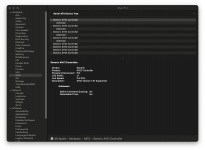
- Boot sequence takes a while, after which none of the SATA devices show up. In System Information, they all show as Unknown:
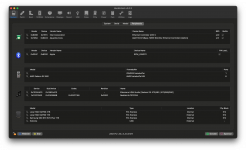
- Can't get Dell DW1820A to work – I mostly use the 10Gbps connection anyway, but I'd like to have all those native Wi-Fi + BT features like Continuity, Handoff, Airdrop etc., and from my understanding, it should be pretty straightforward with the Broadcom chip in the DW1820A. I have tried using OCLP with the kext replacement as per OSXlatitude guide, and weirdly enough, I couldn't get it work. In the process, it would also mess up my Ethernet ports, so I was left with no connectivity, and after injecting Broadcom kexts and patching the kernel, the card would stop showing up in devices altogether. Exported PCIe device list from Hackintool attached to this post below.
- There is something weird going on when I try to reset NVRAM and try to boot. What happens after OC boot selection: Boot progresses for a 2-3s and then reboots the machine, after which the system boots fine (although it is the slow boot with many errors regarding SATA devices). There must be something going on in that first boot that shouldn't be happening…
Here are both kernel-boot.txt and system-boot.txt from Hackintool that cover only the "second" boot (successful), but I'm also including a bigger chunk in system-boot-1.txtthat hopefully covers the "first" (unsuccessful) boot as well:
Current EFI and export from IORegistryExplorer v2.1 attached. Also attaching the SysReport generated by OC during one of the previous boots and 2 OC boot logs from the current boot sequence (similar to the ones above - first "unsuccessful" boot and then the second "successful" one).
Thanks in advance - hopefully we can figure all of this out!
Attachments
-
pcidevices.plist18.9 KB · Views: 0
-
2025-3-9-13-27-30-EFI.zip18.9 MB · Views: 1
-
ASUS ProArt X670E-CREATOR WIFI IORegistryExplorer export.zip1.2 MB · Views: 0
-
opencore-2025-03-09-033124-first-unsuccessful.txt256 KB · Views: 1
-
opencore-2025-03-09-033237-second-successful.txt256 KB · Views: 0
-
SysReport.zip145.4 KB · Views: 0
Last edited: